Configure TMAuthentication first, then TMTickets.
Important Note
Many Apps use a single API Key because the App only supports a single Team, Artist, or Venue.
However, you may want your App to support multiple API keys (for example a Venue App with multiple Home Teams, or an App that covers many Team in the league).
If so, you must enable ephemeral browsing for login; see Switching Teams without Logging Out
Example code:
Also make sure that you observe TicketsSDKSingleton.sessionExpiredDelegate so that you can handle Session Expired errors (usually by logging out the user).
class MainActivity : AppCompatActivity() {

    override fun onCreate(savedInstanceState: Bundle?) {
        super.onCreate(savedInstanceState)

        // Handle session expiration
        lifecycleScope.launch {
            TicketsSDKSingleton.sessionExpiredDelegate.collect {
                TicketsSDKSingleton.logout { onLogout() }
            }
        }
    }

    // Do this wherever you need to start Auth and Tickets SDK
    suspend fun setupAuthAndTicketsSDK() {
        val authentication = TMAuthentication.Builder(
            apiKey = BuildConfig.CONSUMER_KEY,
            clientName = BuildConfig.TEAM_NAME // Team name to be displayed
        )
            .colors(createTMAuthenticationColors(brandingColor))
            .environment(TMXDeploymentEnvironment.Production) // Environment that the SDK will use. Default is Production
            .region(TMXDeploymentRegion.US) // Region that the SDK will use. Default is US
            .build(this)
            .getOrThrow()

        TicketsSDKClient.Builder(
            colors = createTicketsColors(brandingColor) // Optional value to define the colors for the Tickets page
        )
            .authenticationSDKClient(authentication) // Authentication object
            .build(this) // Function that generates a TicketsSDKClient object
            .apply {
                // After creating the TicketsSDKClient object, add it into the TicketsSDKSingleton
                TicketsSDKSingleton.setTicketsSdkClient(this)
            }
    }

    private fun createTMAuthenticationColors(color: Int): TMAuthentication.ColorTheme =
        TMAuthentication.ColorTheme(
            // The Color class is part of the Compose library
            lightColors = lightColorScheme(
                primary = Color(color),
                secondary = Color(color),
                onPrimary = Color.White // Color used for text and icons displayed on top of the primary color.
            ),
            darkColors = darkColorScheme(
                primary = Color(color),
                secondary = Color(color),
                onPrimary = Color.White // Color used for text and icons displayed on top of the primary color.
            )
        )

    private fun createTicketsColors(color: Int): TicketsColorScheme =
        TicketsColorScheme(
            primary = TicketsColor(color.toLong()),
            eventsTopBar = TicketsColor(color.toLong())
        )
}
import Foundation
import TicketmasterAuthentication
import TicketmasterTickets
class Example: NSObject {
func configure() {
// build a combination of Settings and Branding
let tmxServiceSettings = TMAuthentication.TMXSettings(apiKey: "12345",
region: .US)
let branding = TMAuthentication.Branding(displayName: "My Team",
backgroundColor: .red,
theme: .light)
let brandedServiceSettings = TMAuthentication.BrandedServiceSettings(tmxSettings: tmxServiceSettings,
branding: branding)
// configure TMAuthentication with Settings and Branding
print("Authentication SDK Configuring...")
TMAuthentication.shared.configure(brandedServiceSettings: brandedServiceSettings) { backendsConfigured in
// your API key may contain configurations for multiple backend services
// the details are not needed for most common use-cases
print(" - Authentication SDK Configured: \(backendsConfigured.count)")
// TMTickets inherits it's configuration and branding from TMAuthentication
print("Tickets SDK Configuring...")
TMTickets.shared.configure {
// Tickets is configured, now we are ready to present TMTicketsViewController or TMTicketsView
print(" - Tickets SDK Configured")
} failure: { error in
// something went wrong, probably TMAuthentication was not configured correctly
print(" - Tickets SDK Configuration Error: \(error.localizedDescription)")
}
} failure: { error in
// something went wrong, probably the wrong apiKey+region combination
print(" - Authentication SDK Configuration Error: \(error.localizedDescription)")
}
}
}
Android Color Customization
Android Only: The color customization API described in this section is Android-specific. For iOS color and branding configuration, see the branding options available on
TMTickets.shared.configure().
The Tickets SDK provides two mechanisms for customizing colors on Android: a primary color set during initialization, and a TMTicketsBrandingColor API for fine-grained control over three distinct color roles.
Setting the Primary Color
When you initialize TicketsSDKClient, the color() function sets the main color for the SDK.
Using TMTicketsBrandingColor
TMTicketsBrandingColor allows you to customize three color roles independently: branding, ticket, and header.
Call these methods after build() on TicketsSDKClient, but before calling TicketsSDKSingleton.getEventsFragment.
For a complete working example, see the Android-TicketsDemoApp, specifically the TicketsSdkHostActivity class.
Branding Color
TMTicketsBrandingColor.setBrandingColor(context, colorInt)Sets the main color of the SDK. This color is applied to material button backgrounds and tab backgrounds.
.png)
.png)
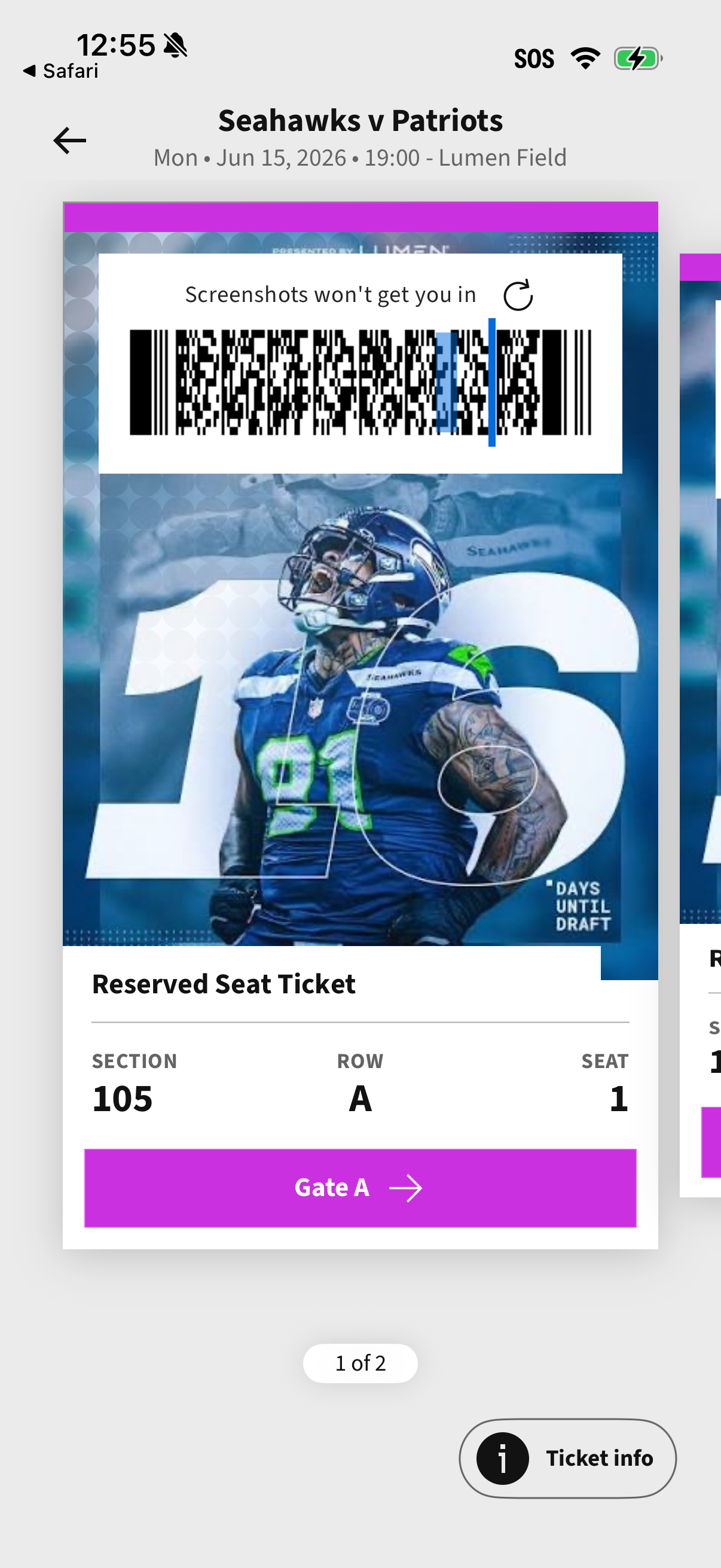
Ticket Color
TMTicketsBrandingColor.setTicketColor(context, colorInt)Sets the color of the headers in all ticket cards.
Header Color
TMTicketsBrandingColor.setHeaderColor(context, colorInt)Sets the color of the header/app bar in the My Tickets screen.
Example: Applying All Three Colors
import com.ticketmaster.tickets.ticketssdk.TicketsSDKClient
import com.ticketmaster.tickets.ticketssdk.TicketsSDKSingleton
import com.ticketmaster.tickets.ticketssdk.TMTicketsBrandingColor
import androidx.core.content.ContextCompat

// Build the SDK client first
val ticketsClient = TicketsSDKClient.Builder(context)
    .apiKey("YOUR_API_KEY")
    // ... other configuration ...
    .build()

// Apply color customization after build(), before getEventsFragment()
TMTicketsBrandingColor.setBrandingColor(context, ContextCompat.getColor(context, R.color.your_brand_color))
TMTicketsBrandingColor.setTicketColor(context, ContextCompat.getColor(context, R.color.your_ticket_color))
TMTicketsBrandingColor.setHeaderColor(context, ContextCompat.getColor(context, R.color.your_header_color))

// Now retrieve the fragment
val eventsFragment = TicketsSDKSingleton.getEventsFragment()
Note: Color values must be resolved color integers (e.g., from
ContextCompat.getColor()), not resource IDs.
Next: Authentication